
← All tutorials
How to import a PDF bank statement
A statement in, clean transactions out, all on your phone.
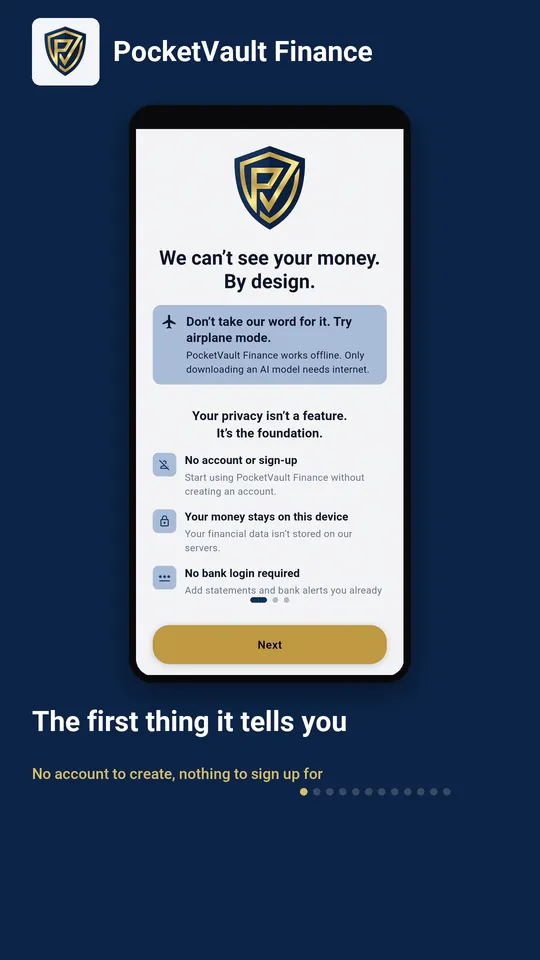
Step by step
- 1 The first thing it tells you No account to create, nothing to sign up for
- 2 Two settings, already filled in Region and currency, read from your phone
- 3 Start by bringing your money in The statement your bank already sent you
- 4 Choose PDF bank statement It lists the banks it can read
- 5 Pick the file your bank sent Straight from your downloads
- 6 Every row, read on your phone Check them before anything is saved
- 7 Tap Import Nothing is written until you do
- 8 It recognised your bank And makes the account the rows belong to
- 9 Here is what it found Money in, money out, and where most went
- 10 Move to the month it covers Your ledger opens on today by default
- 11 Your ledger, no longer empty And it flags the rows needing a category
- 12 And you have an account Created from the statement, with its balance
Keep your finances to yourself.
Every feature you need is free, and there's no account to create. Download it and your data stays on your device.